Hugie Bunny: A Playful Display Font for Web Design and Digital Branding
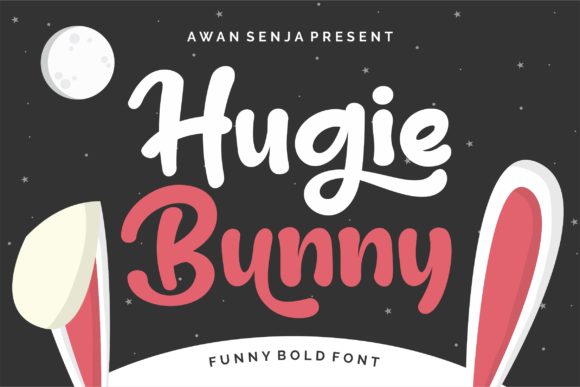
As a web designer, I’m always on the lookout for fonts that bring personality without compromising usability. Hugie Bunny is one of those rare display fonts that manages to be both fun and functional. Its thick, rounded letterforms and cartoonish charm make it a standout choice for digital projects that need a touch of warmth and approachability.
Hugie Bunny isn’t meant to be used everywhere on a page. It shines brightest in short bursts—headers, hero sections, call-to-action buttons, and branding elements. The font’s bold presence helps establish visual hierarchy, guiding the user’s eye through a layout with ease. Because of its strong character, it’s best reserved for moments where you want to create an emotional connection or highlight key messaging.
Perfect for Brand-Centric Web Experiences
When designing a website or digital product, brand tone is just as important as layout and color. Hugie Bunny injects a sense of playfulness and friendliness into any design, making it ideal for brands in the children’s space, creative industries, or lifestyle niches. Whether you’re building a boutique online store, a coaching website, or a creative portfolio, this font adds a layer of personality that helps your brand stand out.
Using Hugie Bunny in logo design or brand kits can set the tone for the entire user experience. Paired with a clean sans serif or serif font for body text, it creates a balanced contrast that feels modern and intentional. This kind of font pairing is essential for maintaining readability while still keeping the design visually engaging.
How to Use Hugie Bunny Effectively in Layouts
In web design, context matters. Hugie Bunny works best when used sparingly and strategically. Here are some practical use cases where this font truly excels:
- Hero Titles: Use Hugie Bunny in large headers to grab attention immediately. Its bold, rounded edges make it highly legible even at a glance.
- Call-to-Action Buttons: The font’s friendly tone encourages interaction, making it a great fit for buttons like “Sign Up” or “Learn More.”
- Section Headings: It adds a whimsical yet clear visual break between content sections, especially in landing pages or product pages.
- Blog Graphics: When designing featured images or quote graphics for social media, Hugie Bunny makes text overlays pop.
- Digital Ads: Whether for banners or promotional images, this font draws the eye without feeling overwhelming.
Because of its decorative nature, avoid using Hugie Bunny for long blocks of text or small labels. It’s best suited for short, impactful phrases that benefit from a bit of visual flair.
Readability Considerations for Responsive Design
When using Hugie Bunny on the web, it’s important to consider how it performs across screen sizes and layout contexts. On mobile devices, the font maintains its clarity at larger sizes, but can become less readable if scaled too small. For responsive designs, ensure that Hugie Bunny is used primarily in headers and prominent UI elements rather than navigation labels or form fields.
When placing the font over images or dark backgrounds, always test contrast levels to ensure legibility. Using a subtle drop shadow or light outline can help the text stand out without sacrificing readability. For light backgrounds, Hugie Bunny’s boldness ensures it remains crisp and easy to scan.
Font Pairing Strategies for Web Design
One of the most effective ways to use Hugie Bunny is in combination with a more neutral typeface. Pairing a playful display font with a clean sans serif or serif font helps maintain balance in your design. For example:
- Sans Serif: Pair with fonts like Open Sans or Montserrat for body text, creating a modern and accessible layout.
- Serif: Use with a classic serif like Merriweather for a more editorial or upscale feel, especially in blog headers or portfolio sites.
- Script: Combine with a softer script font for a cohesive, hand-crafted brand identity, particularly in boutique or lifestyle branding.
This kind of font pairing not only enhances readability but also supports a clear visual hierarchy, making your content easier to navigate and more engaging for users.
Technical Considerations for Web Use
Before implementing Hugie Bunny into a live project, it’s important to verify the font’s technical specifications. Check for available webfont formats (WOFF, WOFF2), multilingual support, and alternate character sets. These factors ensure the font displays correctly across different browsers and languages, especially for international brands or e-commerce stores.
Also, consider font weight variations. While Hugie Bunny is typically a single-weight display font, some versions may include alternates or stylistic sets that offer more flexibility. These can be useful for creating subtle design variations without switching fonts.
Licensing and Commercial Use
When using Hugie Bunny for client work, online stores, or digital templates, always confirm that you have the appropriate commercial license. Many display fonts are available under premium licenses that allow for web use, but restrictions can vary by provider. Be sure to review the font’s End User License Agreement (EULA) to avoid legal issues down the line.
For SaaS platforms, landing page builders, or theme developers, a proper license ensures the font can be embedded across multiple sites without violating usage terms. If you're unsure, reach out to the font creator or distributor for clarification.
Final Notes on Hugie Bunny’s Digital Value
Hugie Bunny is more than just a decorative typeface—it’s a tool for shaping user experience and brand identity. Its thick, rounded forms and cartoonish appeal make it a versatile asset in modern web design, especially when used with intention and care. Whether you’re designing a landing page, rebranding a digital product, or crafting a visual identity, Hugie Bunny offers a unique blend of charm and clarity that few other display fonts can match.